
Saving and sharing
A query worth building once is usually worth keeping. Research offers three ways to hold on to one: bookmarks, the page URL, and downloading the results.
Bookmarks
Bookmarks, at the top right of the page, saves the current query so you can return to it later.
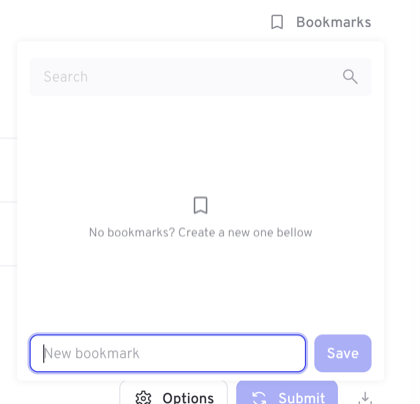
To save the query you are looking at, type a name into the field at the bottom of the panel and choose Save. Saved bookmarks are listed in the panel, with a search box for when the list grows.
Selecting a bookmark restores the query it was saved with, then run Submit to refresh it against current data.
TIP
Bookmarks store the question, not the answer. A bookmark saved with a rolling range such as Last 7 days moves with you and covers the most recent seven days each time you open it.
Sharing a query by link
The page URL contains the whole query — range, audience, filters, breakdown, metric, interval and chart type. Copying the address from your browser and sending it to a colleague gives them the same query, ready to submit.
This is the quickest way to settle a question about a number: send the query rather than a screenshot, and the other person can check it and carry on exploring from there.
WARNING
A link only works for someone who can already sign in and who has access to the same dataset. It carries the query, not the data or any permissions.
Downloading results
The download icon beside Submit takes the results of the current query away with you as a file.
Research is built for exploring on screen, so it is best for modest result sets. When you need a large extract — many dimensions, or a long period at a fine interval — use Exporter, which is designed for the job and runs the extract in the background, collecting the file under Exports in your account menu.