
Booking a campaign
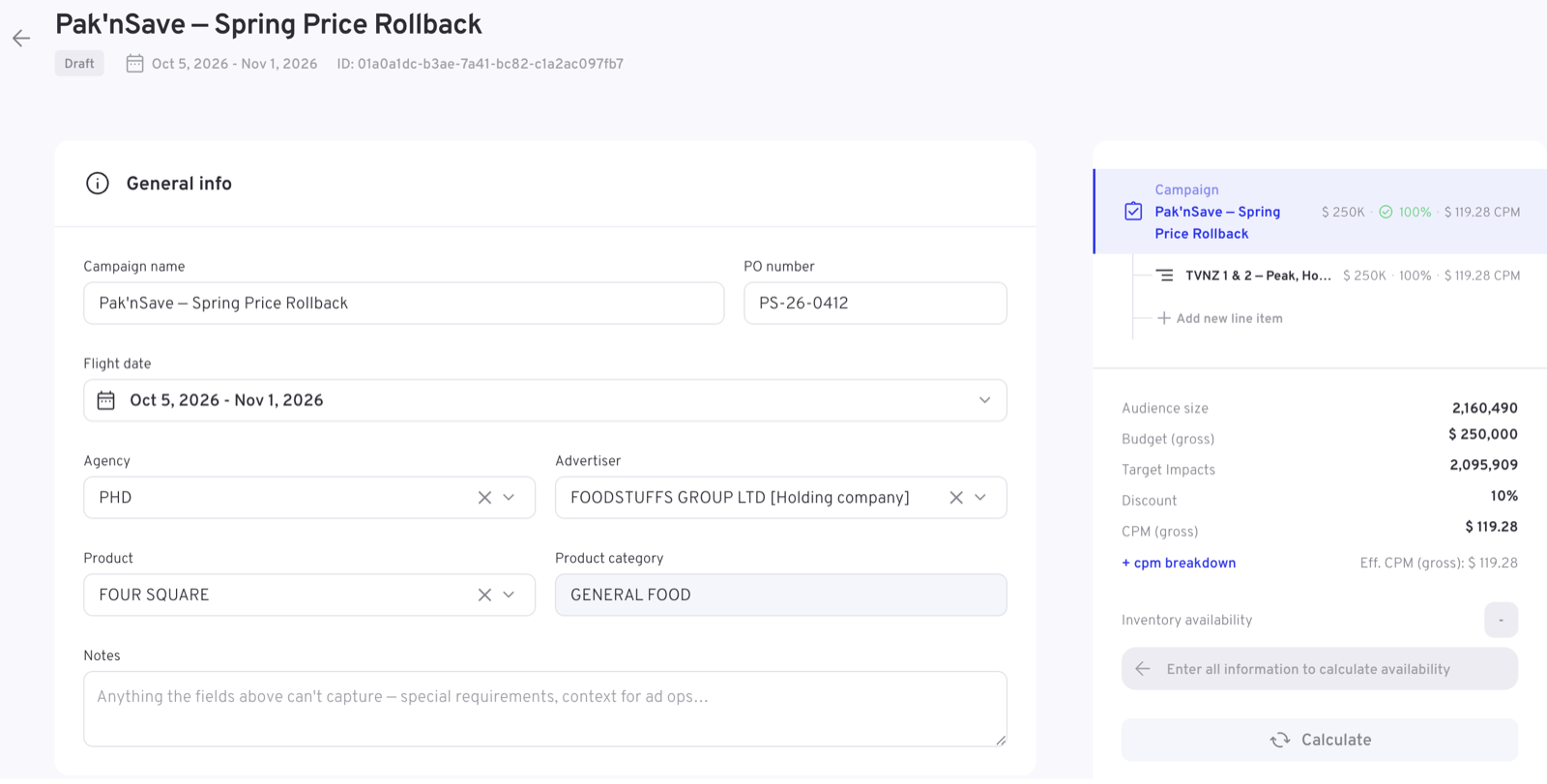
Where booking is enabled, campaigns aren't just monitored in the dashboard — they're created there. New campaign in the Campaigns module opens the booking form: one place to define what runs, where it's targeted, what it should deliver, and with which creatives.
Your form is configured for you
Before anything else, the most important thing to know: the booking form is not the same for every client. It's assembled from your organisation's setup —
- which sections and fields appear, and in what order
- which campaign types are on offer, and what they're called
- the terminology — one account's placements are another's line items
- defaults, allowed ranges, and what's mandatory before you can book
- which of the optional capabilities below are present
All of that reflects your sales process, your data, and what your inventory setup can support. So treat this page as a description of the shape of booking — your form will follow it, but the details on your screen are your own. Where fields need explaining individually, that belongs to your client documentation.
For administrators
The form's terminology follows account settings — the placement term, for example, is set in Administration → General.
The shape of a booking
A booking has two levels:
| Level | Defines |
|---|---|
| Campaign | The commercial frame: who it's for, when it runs, the overall budget |
| Line items | The delivery: what's targeted, scheduled and served, and against which goals |
A campaign contains one or more line items. That's the structural idea the whole form is built around — the left side is the form for whichever level you're editing, and a rail on the right shows the campaign's structure, so you can move between the campaign and its line items as the booking grows.
Campaign level
The campaign level typically covers:
- General information — name, your reference numbers (such as a PO number), the agency and advertiser, the product being advertised, and the flight dates
- Campaign type — a choice between the kinds of campaign your organisation books, each described on its card. The type you pick shapes the rest of the form: it decides which fields and sections the line items will offer
- Budget — the overall budget, and commercial terms such as a discount or a deal
Line item level
Each line item then defines a unit of delivery. Depending on your setup this covers:
- Product — what kind of inventory this line item runs on
- Targeting — audience, content and context: demographics, segments, genres, channels, programmes, geography, devices
- Budget and goals — this line item's share of the money and its delivery goal, such as target impressions
- Schedule — when it may air: dayparts, air-time windows, days of week
- Creatives — which creatives run, added once the flight dates are set
The form guides the order
You don't have to know the right sequence — the form enforces it gently. Line items unlock once the campaign essentials are in place, and until then the form lists exactly what's still needed. The same applies within sections: choices that depend on other choices stay disabled until their prerequisites are set, and anything the form can summarise for you is shown on collapsed sections so you can review a booking without opening every panel.
The summary rail
The right-hand rail keeps the running state of the booking in view while you type:
- the structure — the campaign and its line items, for navigation
- live totals — budget, target impressions, discount and the resulting CPM
- inventory availability — see below
Checking availability
Booking against inventory that can't deliver helps nobody, so the form can check availability before you commit: once a booking has enough information, it calculates whether the targeted inventory can support the goal in the chosen flight.
Use it as part of the booking rhythm — set up a line item, check availability, adjust targeting, budget or flight if it comes back tight, and book when the plan is realistic.
Drafts, and what happens after booking
A booking doesn't have to be finished in one sitting — it can be saved as a draft and picked up later. Once booked, the campaign joins the campaign list and moves through its delivery states — booked, active while in flight, completed at the end — with its pacing tracked like any other campaign. Which states your list shows (for example whether planned or cancelled campaigns appear separately) again follows your setup.
Optional capabilities
Beyond the core flow, booking supports a set of features that are enabled per client — they depend on your setup and what your inventory and data can support. If one of these isn't in your form, it isn't part of your current configuration; if you think it should be, that's a conversation with tvbeat rather than a setting you can flip.
| Capability | What it does |
|---|---|
| Flight pacing | Controls how delivery is spread across the flight — evenly, or broken down week by week or month by month with a budget per period |
| Blackout periods | Date ranges within the flight when a line item must not air — around embargoes, sensitive dates or competing commitments |
| Creative rotation | Multiple creatives on one line item, each with a rotation share — and, where needed, its own date range within the flight |
| Frequency capping | Limits how often the same viewer sees the campaign within a chosen window |
| Audience targeting | Line items aimed at audience segments — including audiences defined in Audience manager — rather than content alone |
| Peak share & break position | Guarantees for where spots land: a minimum share delivered in peak time, or a preference for first or last position in the break |
| Rate-card pricing | CPM derived automatically from your rate card based on the line item's targeting, with the option to override it with a custom price |
| Deals & commercial terms | Bookings attached to negotiated deals, with their pricing reflected in the totals |
| Availability forecasting | The inventory check above — per-line item delivery forecasts before booking |
| Measurement add-ons | Extras attached at booking time, such as link tracking, brand-lift measurement or conversion tracking |
| Sponsorship elements | Sponsorship-specific inventory such as openers and credits, booked alongside standard delivery |
WARNING
This list describes what the platform can do, not what any one account has. Your form is the source of truth for your setup.