
Deals, rates and loadings
Every line item that trades on a rate carries one — CPM (gross) on most campaign types, CPT (gross) on an audience-traded Broadcast Activation — and the form fills it in for you. This page explains where that number comes from, what moves it, and how a deal and the discount sit on top, so the figure on the rail is never a surprise.
The short version
The rate starts from the rate card for your demographic and ad duration. Each choice that asks more of delivery — a peak guarantee, a pinned channel share, a position in the break, a longer spot — adds a loading, a percentage on top of the base. A deal can replace that build-up with negotiated terms. The Discount % comes off last. Everything the form shows is gross.
How a rate is built
The rail's + cpm breakdown opens the build-up for the line item you are on. Read it top to bottom:
| Step | What it is | Where you influence it |
|---|---|---|
| Base rate | The rate card price for the trading demographic (linear) or the product (digital), at the ad duration | Demographics, Ad duration, the digital Product |
| + Loadings | Percentage surcharges for the delivery choices below, each shown on its own line with its percentage | Peak %, channel shares, Break position and FIB / LIB %, Ad duration |
| = CPM (gross) / CPT (gross) | The line item's rate — the figure in its Budget section, tagged Rate card | The Rate card / Custom switch |
| − Discount | The campaign-wide Discount % | Campaign budget → Discount % |
| = Eff. CPM (gross) | What the budget actually buys at, shown under the breakdown link on the rail | — |
Loadings are percentages of the base rate and they add up, so two loadings of 5% and 7.5% together make the rate 12.5% dearer than the base — not 5% and then 7.5% of the result.
A worked example (illustrative percentages)
A demographic with a base rate of $100 CPM at 30 seconds.
- You guarantee more peak than the demo delivers naturally: +7.5%
- You ask for first in break with a minimum share: +5%
- Gross rate: $100 + $7.50 + $5.00 = $112.50 CPM, tagged Rate card
- The campaign carries a 10% discount: $112.50 − $11.25 = $101.25 effective
Move the peak guarantee back to the demo's natural level and the first line disappears; the rate falls to $105.00 gross before discount.
Where the base rate comes from
Linear — Brand Awareness and audience-traded Broadcast Activation. The base is the rate card for the trading demographic you choose in Targeting, at the Ad duration set in Creatives. That is why Demographics is the field to set first: the universe estimate, the channel shares you are offered and the peak levels on the list all follow it, and so does the price.
Digital — Digital Activation. Each product card carries its own pricing — Network Video from the rate card, Social Stream on the same base, Ads on Pause from the agency's AOP Targeted CPM — so the base changes when the product does. Daily Reach Blast stands outside the build-up altogether: it is a one-day buy at the agency's daily price, with no CPM, no loadings and no discount, and it is left out of the campaign's blended CPM.
Ad duration is part of the base on every type that trades on a rate. Thirty seconds is the basis; a longer spot re-prices from it, which is why the field says Drives the CPM price — creatives added later must match. Set it before you read the rate.
Spot and Sponsorship are budget only. Neither carries a rate, so nothing on this page applies to them beyond the campaign Budget cap.
The loadings
Each of these is a choice in the line item's form. Leave the field at its default and it costs nothing; move it and the breakdown shows the loading it adds.
| Choice | Field | What it does to the rate |
|---|---|---|
| Peak guarantee | Targeting → Peak % | The demographic's natural delivery level — labelled in the list, 64% (natural delivery) — is the zero point. Every point of peak you guarantee above it adds to the rate; choosing a level below natural buys less peak than the demo delivers on its own and takes the rate down. 0% (no peak delivery) is an off-peak-only buy. On Brand Awareness the range runs 70–100% |
| Channel shares | Targeting → TVNZ 1, TVNZ 2, TVNZ Duke | Optimized lets delivery fall where it performs and carries no loading. Pinning a share moves delivery away from the channel's natural level, and the loading grows with the distance — pinned above or below. Each channel's loading is worked out on its own and they add up. A share pinned to 0% is a deliberate exclusion, priced as one |
| Break position | Targeting → Break position, FIB / LIB % | No preference costs nothing. First in break or Last in break with a minimum share carries a premium, and the higher the share you guarantee, the higher the loading |
| Ad duration | Creatives → Ad duration | Part of the base rather than a loading, but it behaves like one: longer than 30 seconds costs more, in proportion |
| Brand Lift | Measurement → Brand Lift | Digital only. Adds a flat +$3 CPM to the line item, inside the campaign budget, shown as its own row in the breakdown. Not added on a custom CPM |
Untouched is not the same as pinned
On channel shares and Peak %, the option that costs nothing is the one that matches what the demographic does naturally — Optimized on a channel, the natural delivery level on peak. Typing the natural value in by hand prices the same; pinning a channel to 0% or peak to 0% does not — both are hard instructions with a price of their own.
Deals
A deal is a trading agreement between TVNZ and an agency or advertiser, held in Landmark. You attach one in Campaign budget → Deal, and the list only offers deals that fit the booking: the agency, advertiser and product on the campaign, its flight, the campaign type and, on Broadcast Activation, the buying method.
Each deal in the list is tagged with how it prices. At ratecard deals keep the rate-card build-up described above and bring their own terms and discount to it; Fixed CPT deals replace the build-up with a contracted rate, set per period and shown in full when you hover the deal in the list — see the Deal field.
Once a deal is selected, the form follows its terms:
- The rate arrives from the deal. A line item's CPM or CPT is filled in from the agreement rather than built up from the rate card, and it still shows as Rate card on the switch — the deal is the rate card for this booking.
- The option lists narrow to the deal's terms. Demographics, the channel shares, the Peak % levels and the FIB / LIB % shares you are offered are limited to what the deal covers, so a deal struck on one audience and one channel split cannot quietly be booked on another.
- The discount follows the deal. The suggested Discount % comes from the deal together with the agency, advertiser and campaign type. A deal with a fixed price holds it at 0%, because the price is already the agreed one.
A deal is required before a Brand Awareness or audience-traded Broadcast Activation campaign can leave Draft. Change the deal and the rate, the discount and the option lists change with it — check the rail before you book.
Deal or rate card?
Where the agency has a deal for this advertiser, use it: the rate is the negotiated one and the terms cannot drift. Book off the rate card only where no deal applies, and treat the loadings as the price of every delivery guarantee you add.
Discount %
Discount % lives at campaign level, in Campaign budget, and applies to every line item. It comes off after the loadings, so it discounts the loaded rate, and the rail shows both figures: CPM (gross) before it and Eff. CPM (gross) after. Its suggested values follow the agency, the advertiser and the deal; Sponsorship offers no discount, being budget only.
Custom rates
The Rate card / Custom switch beside the rate lets you type your own — Based on rate card from targeting — or switch to custom. A custom rate replaces the build-up: the loadings no longer move it, and the platform keeps the delivery goal in step with the budget at the rate you typed. Use it only for a price agreed outside the form, and say so in the campaign Notes, because the breakdown can no longer explain where the number came from.
Reading the rail
Under the campaign tree, the rail keeps the commercial totals for the level you are on: Audience size, Budget (gross), the delivery goal — Target Impacts or Target TARPs — Discount, the rate, and beneath it + cpm breakdown with Eff. CPM (gross).
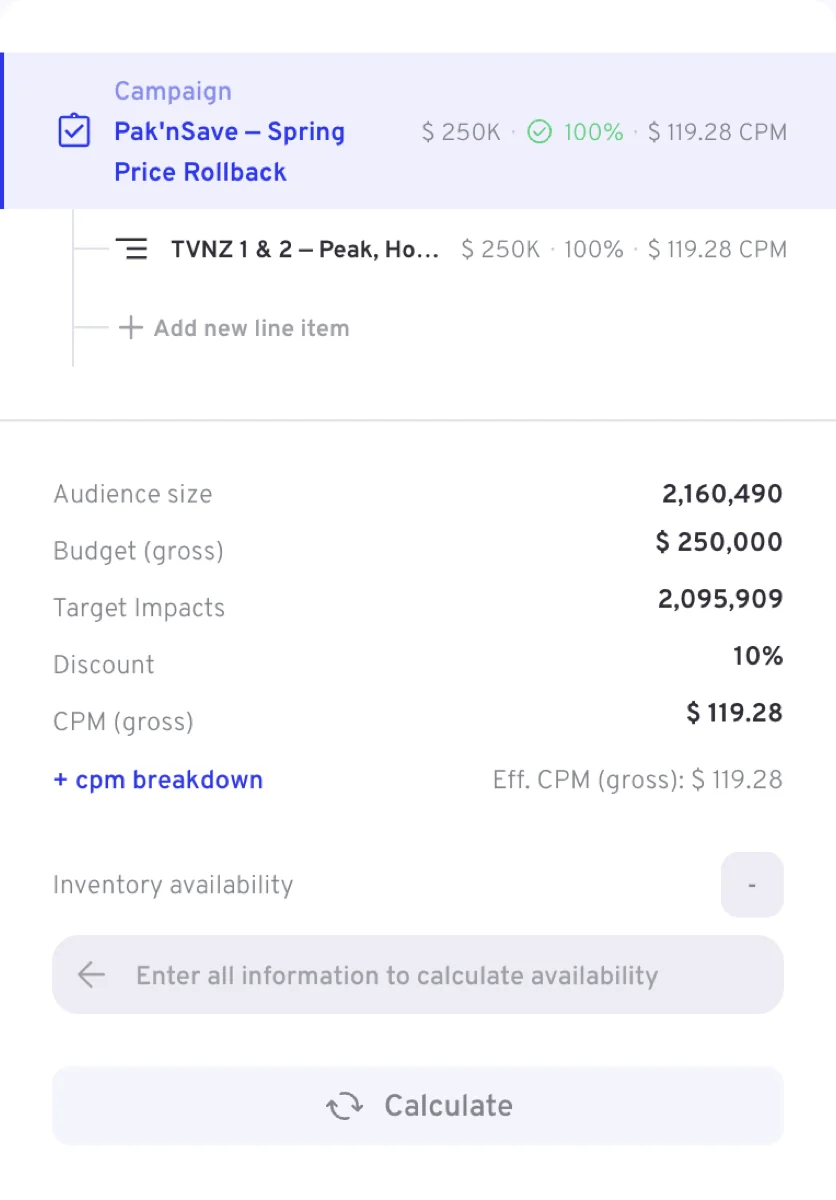
Two things to know when reading it:
- The campaign rate is a blend. Each line item in the tree shows its own budget, share and rate; the campaign figure is weighted by delivery, so with several line items it will not equal any one of them. Once booked it is the campaign's Booked eCPM in the campaign list.
- Budget, goal and rate agree by construction. The goal is Calculated from the budget at the current rate, so changing anything that moves the rate — a loading, the deal, the duration — moves the goal, not the budget.
Related
- Campaign level — the Deal, Budget cap and Discount % fields
- Line items — the Budget section and the Rate card / Custom switch
- Broadcast Activation — peak and break position on an audience-traded buy
- Field reference — every field, with its type and defaults