
Booking on TVNZ
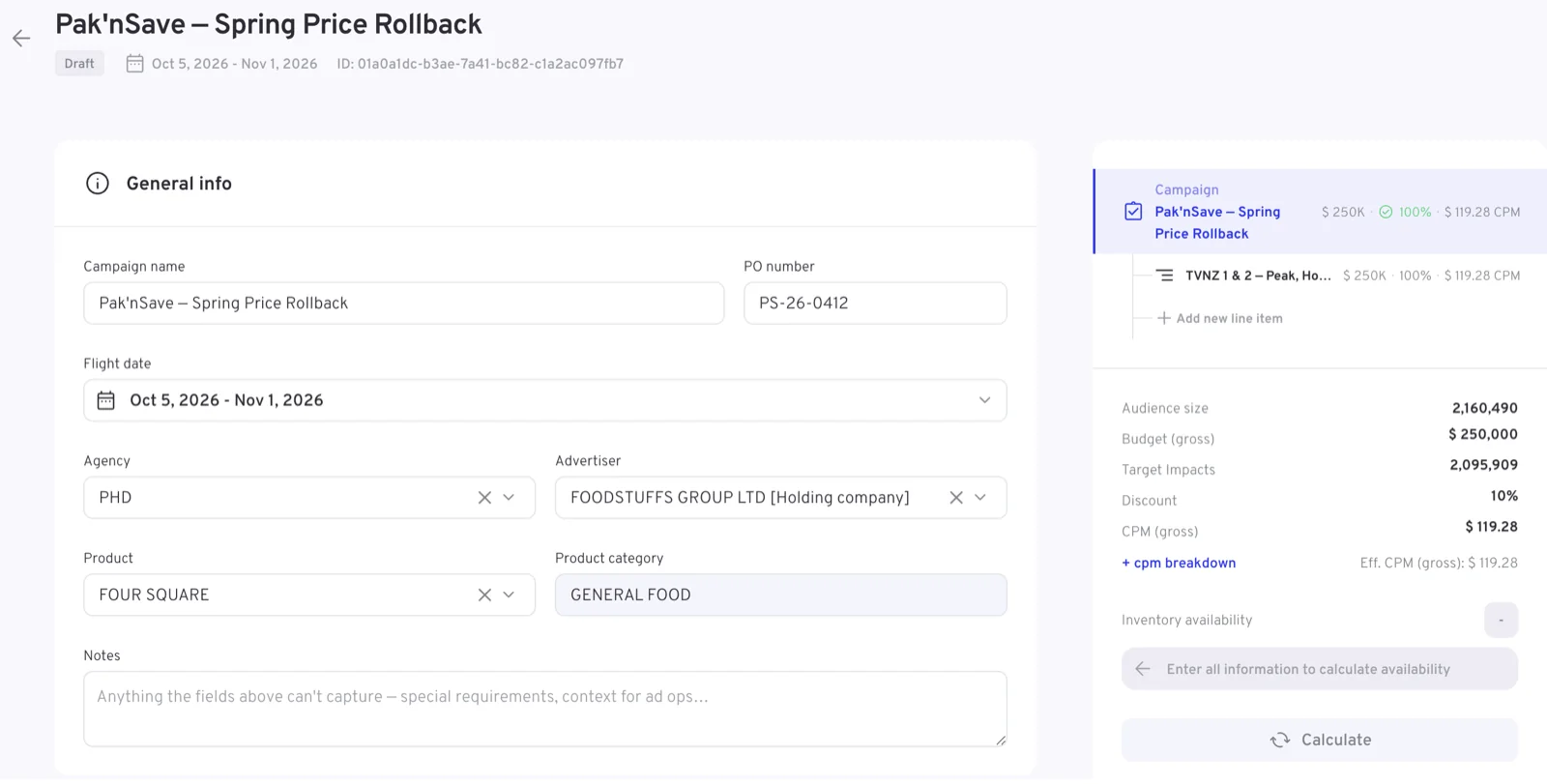
Booking is enabled on TVNZ: campaigns are created in the UI, not only reported on there. The New campaign button — on Home or in the Campaigns module — opens the booking form. Campaign and line item parameters are edited on the left side of the form, for whichever level you are editing, while a rail on the right shows the campaign's structure, live totals — budget, the delivery goal, discount and the resulting rate — and an inventory availability check. A bar along the bottom holds the options to View summary →, Cancel, Save changes and Book campaign.
These pages describe TVNZ's view of the booking. For the general view of booking across the platform, see Booking a campaign.
That two-column arrangement is what the picture below shows: the form you are filling in on the left, the running picture of the booking on the right.
Before you start, have these to hand
- The agency, advertiser and product, as they are set up in Landmark
- Your insertion order ID and PO number. Both are optional, so a campaign can be planned before you have them
- The deal the booking trades under, where the agency has one — it sets the rate
- Flight dates — remember the start window, and that linear line items sit within one broadcast month while digital works in calendar months
- The campaign Budget cap, and how it splits across line items
- For linear buys the trading demographic; for digital the audience or segment
- Creative codes — a Landmark House ID for linear, a VAST tag for digital
The four campaign types
The campaign type is the first decision that matters: it decides which sections and fields the rest of the form offers.
| Type | What it is | Buying methods | Where it delivers |
|---|---|---|---|
| Brand Awareness | Brand messaging reaching the most relevant audience with high accuracy and targeting precision | — | Linear TV, with channel, genre, programme and rating controls |
| Broadcast Activation | Reach on traditional broadcast TV through ad line items within premium programming | Audience Trading, Spot | TVNZ 1, TVNZ 2 and TVNZ Duke |
| Sponsorship | Connecting your brand with programmes you sponsor | — | Sponsored programmes, as openers and credits |
| Digital Activation | On-demand and streaming, to connect with viewers wherever they watch | — | TVNZ+ — network, VOD or live |
Broadcast Activation is the one type that asks for a Buying method: Audience Trading guarantees an audience and optimises spots to deliver your goal, while Spot books a shell campaign whose spots are set later in TVMap.
Campaigns and line items
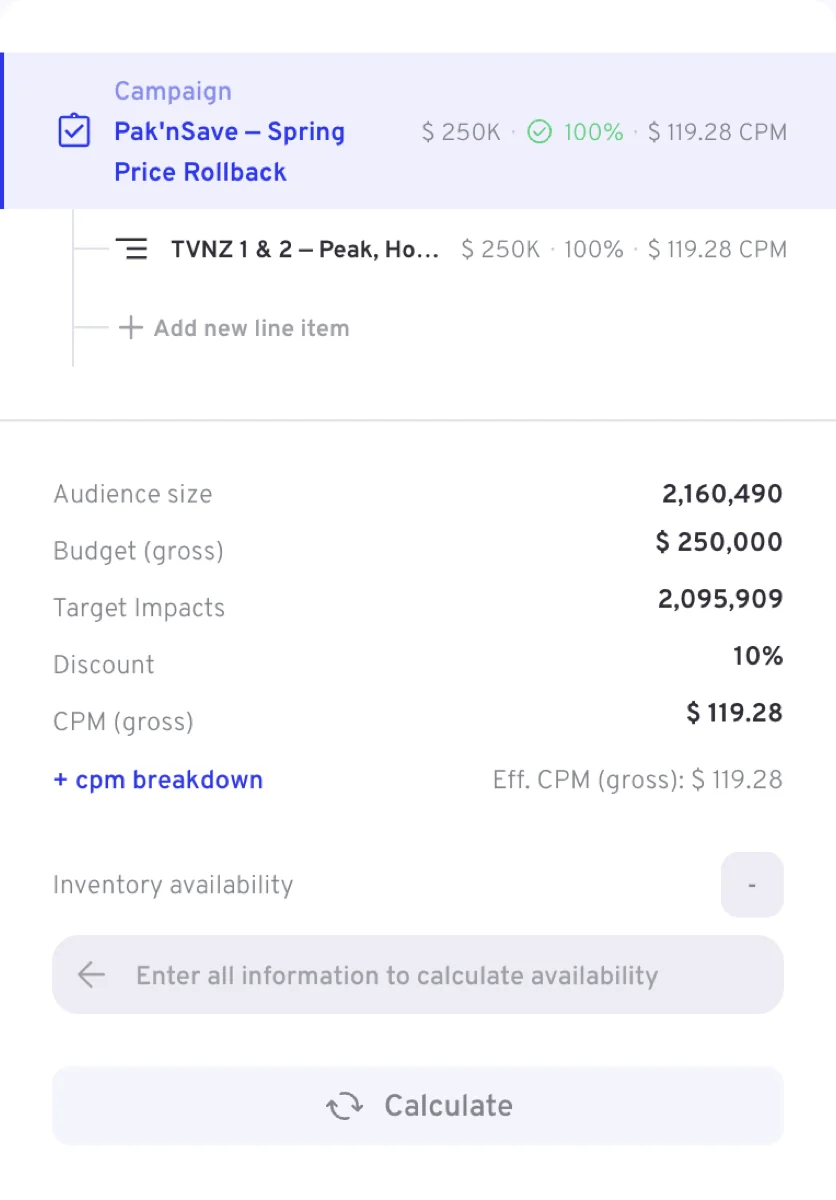
A booking has two levels. The campaign carries the commercial frame — who it is for, the overall flight, the deal, the budget cap and the campaign type. Each line item under it is a unit of delivery with its own flight, targeting, budget, schedule and creatives, and that is where almost all of the detail lives.
Under that structure the calculation tool in the rail on the right keeps the totals: Audience size, Budget, Delivery goal, Discount and the buying metric — the rate — with a + cpm breakdown link that opens how the rate was arrived at — Deals, rates and loadings walks through it. What the goal and the rate are called depends on how the campaign trades — Impacts and CPM on most types, TARPs and CPT on an audience-traded Broadcast Activation.
Statuses and the booking workflow
A campaign's status shows on the header beside the flight and the campaign ID, and it decides what you can still change. The campaign list sorts the same bookings into the five views shown here.

| Status | What it means | How it is reached |
|---|---|---|
| Draft | A working copy. Everything is editable and saves as you go | Created when you start a campaign |
| Pending approval | Submitted, waiting to be confirmed | You send it from Draft |
| Booked | Confirmed, waiting to run | You book it from Draft or Pending approval |
| Active | In flight | Set by the platform when the flight starts |
| Paused | Stopped mid-flight | You pause an Active campaign, and resume it back to Active |
| Completed | Finished | Set by the platform at the end of the flight |
| Cancelled | Called off. Final | You cancel from Pending approval, Booked, Active or Paused |
Completed and Cancelled are final. A campaign can be deleted only while it is in Draft or Cancelled.
The campaign list groups these into its own views — Planned, Booked, Active, Completed and Cancelled — so a view does not always correspond to a single status. Planned covers drafts and bookings that are not yet confirmed, and it is where a new campaign lives until it is booked. Planned and Booked show only in user groups with booking enabled.

Above the list, as the strip shows, sit a Starts in filter with a date range and + Add filter, a Campaigns tab next to a Line items tab, and the New campaign button that starts a booking. The columns are Campaign, Status, Start date, End date, Campaign type, Advertiser, Agency, Budget cap (gross), Target deliveries and Served deliveries. On TVNZ, Home opens as My campaigns and lists the same bookings grouped by Active and Planned / Booked, with a Mine / All switch that narrows the lists to the campaigns you created or widens them to everything your user group can see; in the All view a Created by column names who made each booking.
What you can still change
A campaign stays editable well past booking; what changes is how much, and how a change is applied.
| Status | Editing |
|---|---|
| Draft | Everything, on the campaign and its line items, and it saves as you go |
| Pending approval | Saving an edit withdraws the submission and returns the campaign to Draft |
| Booked | Most fields. Edits are collected into one set of changes that you review and confirm before they apply. Commercial anchors such as the deal are fixed after booking, and the field says so; a budget change sends the campaign back through approval |
| Active | Changes affect remaining delivery only. Dates and budget are bounded — the end date cannot move before the last aired day, the start cannot move into the past, and the budget can only go up — and lists of channels or creatives can be added to but not cut |
| Completed, Cancelled | Read-only |
A field you cannot change is never hidden or silently greyed out: it shows locked, with the reason.
The rules every booking must satisfy
- Flight start window. Past Draft, the campaign flight must start between 5 and 90 days from today for Brand Awareness and Broadcast Activation, and between 5 and 365 days for Digital Activation.
- Line items inside the campaign. Every line item flight must fall inside the campaign flight.
- Budgets add up. Line item budgets must sum exactly to the campaign Budget cap — the campaign budget goal.
- One broadcast month per linear line item. A Brand Awareness or Broadcast Activation line item flight must fall within a single broadcast month — weeks starting Sunday, the month ending on the Saturday nearest its end. Digital Activation works in calendar months, and its flights may span more than one.
- Budget, goal and rate agree. Each line item's Budget (gross) and its goal — Target Impacts at a CPM, or Target TARPs at a CPT on an audience-traded Broadcast Activation — must be consistent with the calculated rate, give or take rounding. The goal is marked Calculated, so it moves with the budget and the rate.
- Splits total 100%. Pace a line item weekly or monthly and the per-period percentages must sum to 100.
- One copy length per line item. A line item can carry several creatives, but they must all be the same copy length.
- A Daily Reach Blast books one date. A Reach Blast line item whose flight spans more than a day is rejected — add a line item per day instead.
Terms and systems you will see
| Term | Meaning |
|---|---|
| Impacts / Target Impacts | The audience delivery unit a line item's goal is set in |
| TARPs / Target TARPs | Target Audience Rating Points — the proportion of the advertiser's target audience exposed to the campaign or programme. The goal an audience-traded Broadcast Activation trades in, bought at a CPT |
| CPM / CPT | Cost per thousand impressions — total cost ÷ impressions × 1,000 — and cost per TARP, the price of reaching one rating point of the target audience. Which one a line item trades in follows the campaign type |
| Rate card | The default source of a line item's CPM or CPT, from your targeting and the deal. Switch it to Custom to price the line item yourself |
| Deal | The negotiated Landmark deal the campaign trades under. It drives the rate that the rate card offers |
| Landmark | TVNZ's sales system. It supplies the agencies, advertisers, products and deals the form offers |
| TVMap | The linear scheduling tool where a Spot buy gets its spots |
| Peak % | The minimum share of delivery you require in peak time |
| FIB / LIB | First in break / last in break — a break-position guarantee |
| Broadcast month | TVNZ's trading month: whole weeks starting Sunday, ending on the Saturday nearest the month end |
| Availability check | The rail's estimate of whether the targeted inventory can deliver the goal in the flight |
Where next
- Campaign level — the fields above the line items
- Line items — every line item section in form order
- Brand Awareness, Broadcast Activation, Sponsorship, Digital Activation — a walkthrough per type
- Field reference — options, defaults and rules field by field, including which fields each type shows and the option lists