
Home
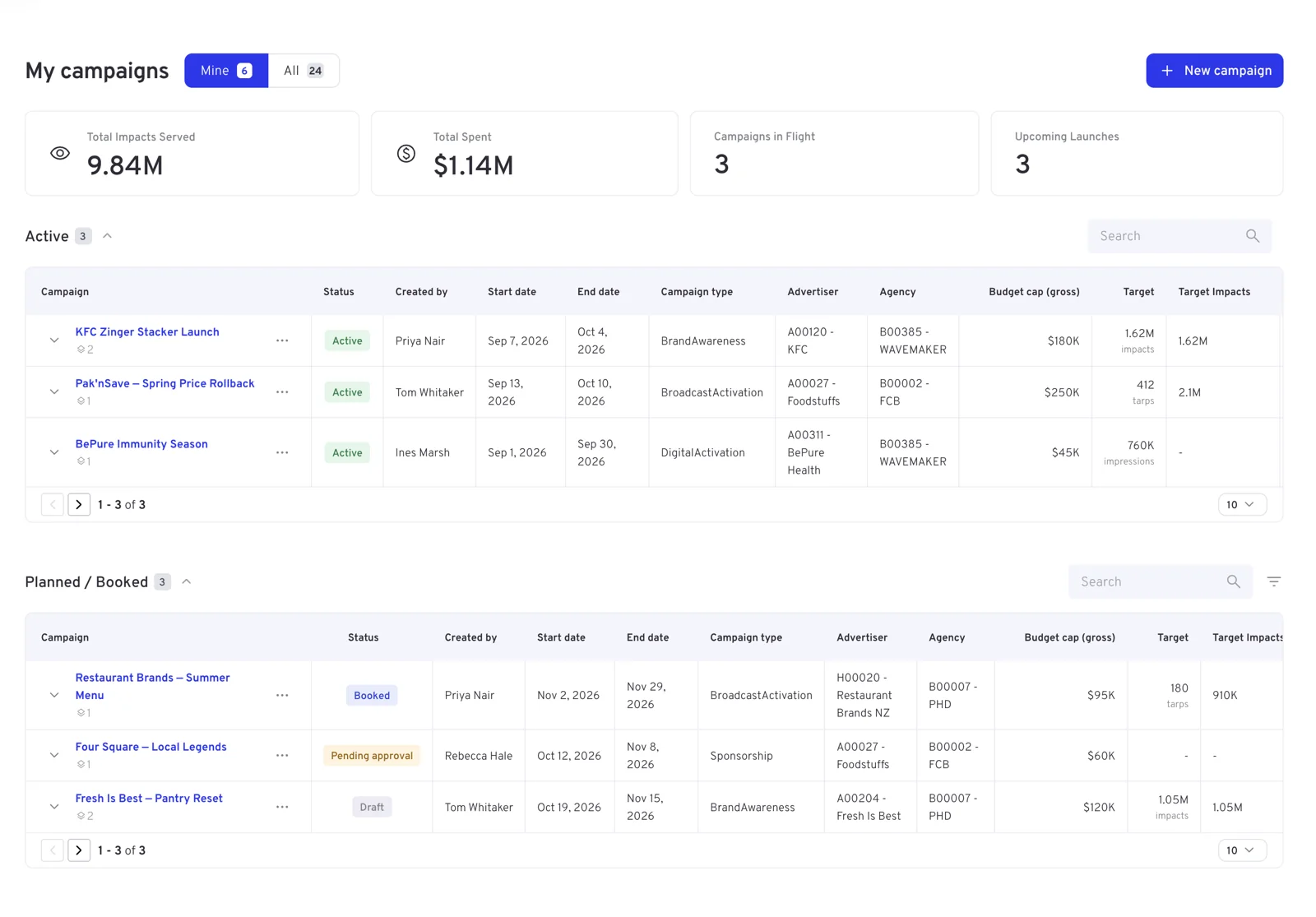
Home is My campaigns: your bookings, where each one stands, and the totals they add up to. It is the first page you see after signing in.
Mine or All
The switch beside the title decides whose campaigns the page shows.
| Shows | When to use it | |
|---|---|---|
| Mine | Campaigns you created. The default | Your own day-to-day list |
| All | Every campaign your user group can see | Covering for a colleague, or a group-level view across the agency |
Each side carries a count, and the tiles and the lists below follow whichever you pick. In the All view the Created by column tells you whose booking each one is.
The tiles
The tiles add up the campaigns listed below them, so they change with the Mine / All switch.
| Tile | Sums up |
|---|---|
| Total Impacts Served | Impacts delivered by the campaigns below |
| Total Spent | Their gross spend to date |
| Campaigns in Flight | How many are in the Active list |
| Upcoming Launches | How many are in Planned / Booked |
| Completed | How many are in Completed |
The lists
Below the tiles the same campaigns are grouped by where they are in their life:
- Active — in flight now
- Planned / Booked — drafts, bookings waiting for approval, and confirmed bookings that have not started
- Completed — finished
Each group has its own search box, and the arrow beside the heading collapses it. Every row shows the campaign name with its number of line items, the status, who created it, the flight dates, the campaign type, advertiser and agency, the Budget cap (gross) and the delivery Target in the unit the campaign trades in — impacts, TARPs or spots — with the target impacts and TARPs alongside. The chevron at the start of a row opens its line items; the … menu at the end holds the campaign's actions. Long lists page ten at a time, with the page size adjustable at the foot.
Starting a booking
New campaign, top right, opens the booking form. Booking on TVNZ walks through it section by section.
Home is the short list; Campaigns is the full one
Home shows the campaigns in view without further filtering. For date ranges, filters by advertiser or agency, the Line items tab and the Cancelled view, use the Campaigns module.